.h
product design · ux · design systems

Meridian
Scheduling.
Reimagined.

From scheduling chaos to a single intelligent system — how we redesigned the way independent professionals manage time, clients, and their professional identity.

Design Lead Team of 3 Designers 12 Months Web · Tablet · Mobile Figma · Design System Stakeholder-Validated
role
Design Lead
team
3 Product Designers
timeline
12 Months
platforms
Web · Tablet · Mobile
tools
Figma · Design System

Three tools.
Three calendars.
Zero coherence.

Independent professionals in creative, lifestyle, and healthcare industries were running a business and doing the work simultaneously — across too many fragmented tools with no unified workflow.

"I don't need another app. I need the apps I already use to talk to each other — and I need my clients to find me without me having to explain what I do every single time."
— Primary research insight, stakeholder sessions
01 / scheduling fragmentation

Manual coordination across everything

Professionals were manually syncing multiple calendars, chasing meeting confirmations, and blocking availability by hand — work that had nothing to do with their actual craft.

02 / broken booking experience

No single path from discovery to booking

Clients had no unified, trust-building way to discover a professional, understand their services, view live availability, and confirm — all in one experience.

03 / invisible professional identity

A static profile in a dynamic world

A static LinkedIn or link-in-bio page couldn't carry the full weight of a professional's identity, services, or real-time availability.

Measuring success.

A single intelligent platform that consolidates scheduling, booking, client management, and personal branding — with clear metrics to validate every decision.

80%
increase in stakeholder
satisfaction — from day one

The most direct signal of the team's operational and output quality transformation, measured from the point of Design Lead transition.

goalmetricstatus
Team efficiency+70% improvement post Design Lead transitionconfirmed
Screen output500+ screens across desktop, mobile & tablet — 20 screens/sprint vs. 6 priorconfirmed
Design system100+ components · 200+ edge cases documentedconfirmed
Stakeholder satisfaction+80% overall satisfaction increaseconfirmed
Design ↔ engineering50% reduction in back-and-forths via established workflowconfirmed

How we went from
chaos to clarity.

phase 01 / discovery

Stakeholder Research & Alignment

Rather than jumping to solutions, we started by understanding the business and professional landscape through structured stakeholder sessions — the primary validation mechanism throughout the project.

  • Qualitative stakeholder interviews with business, product, and domain experts
  • Three professional archetypes: Creative, Healthcare, and Lifestyle
  • Journey maps for both the professional's path and the client's booking path
  • Competitive landscape mapped across scheduling, portfolio, and marketplace tools
phase 02 / ideation

Design System First, Then Features

One of the most consequential strategic decisions: halt feature work and invest in a shared component library before building any screen. This multiplied velocity for the remainder of the year.

  • Token-based design system: color, spacing, typography, elevation
  • Component library: cards, modals, forms, tables, empty states, notifications
  • Cross-platform component variants for Web, Tablet, and Mobile
  • User flows and IA architecture for both Pro and Client journeys
phase 03 / execution

High-Velocity, Validated Output

A structured design operation allowed three designers to work in parallel across six major feature areas while maintaining output quality and stakeholder alignment throughout.

  • Weekly structured critiques with tiered feedback frameworks
  • Stakeholder validation gate before every engineering handoff
  • Clear feature ownership per designer to build deep expertise
  • Figma file architecture organized by flow, not by designer
feature 01 / home dashboard

A schedule that thinks in your format.

The core challenge: give professionals a way to see their schedule in the format that matched their mental model. Some think in time blocks. Others in project pipelines. Others need raw data fast.

Rather than defaulting everyone to a weekly calendar, we designed three distinct views with a persistent toggle: Calendar, Board/Gantt, and Table.

why it matters

A scheduling tool that forces a single view forces a single mental model. We gave professionals the ability to inhabit their work the way they actually think — without losing state between views.

Calendar view
Public profile with calendar picker
feature 02 / smart booking profile

Identity anchored. Booking frictionless.

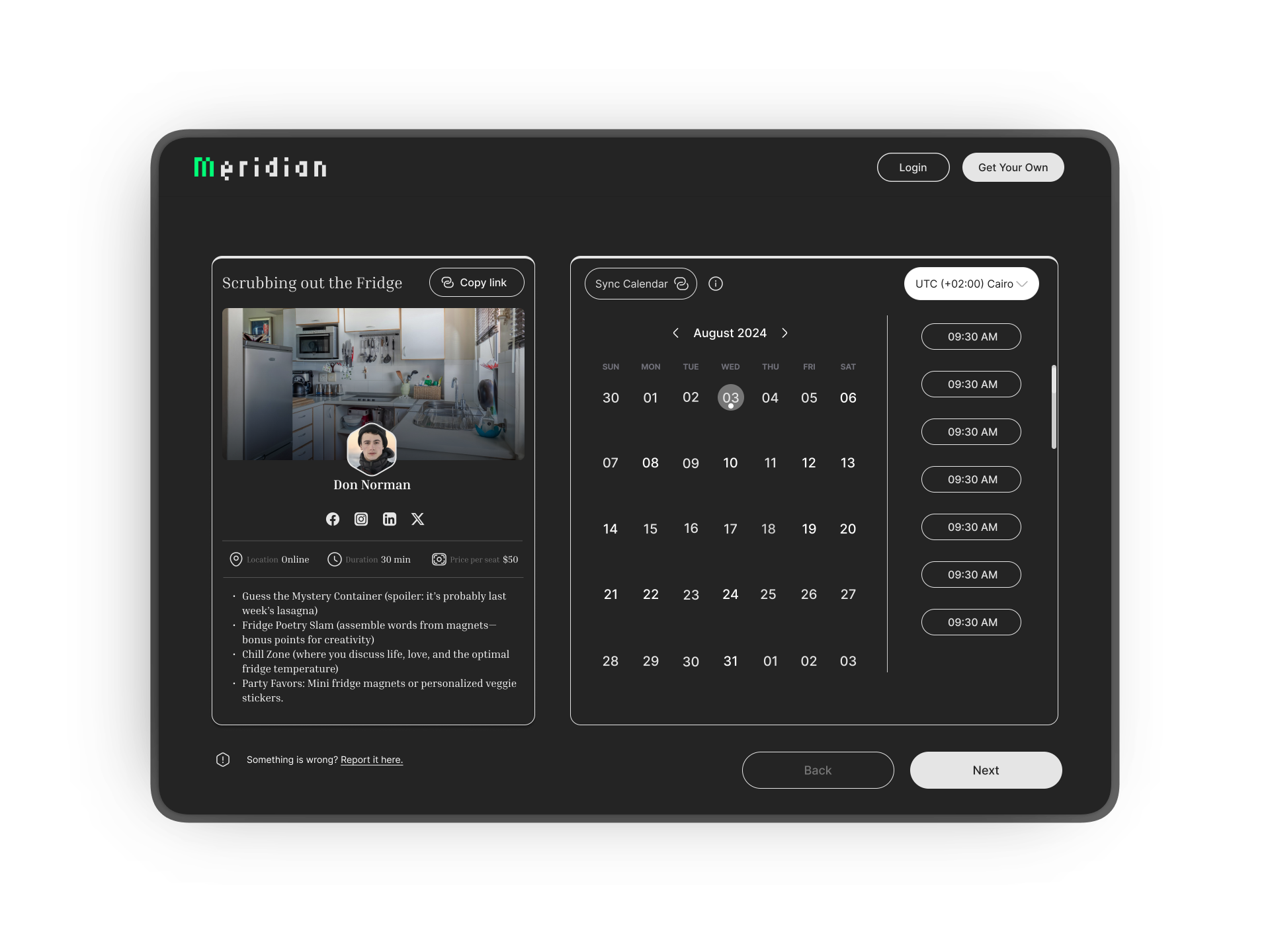
The client-facing booking experience sat at the intersection of personal brand, live calendar availability, and client trust — the most complex design problem on the project.

We designed a two-panel layout: a persistent left panel with the professional's identity and social proof; and a dynamic right panel with a live calendar picker and time slots pulled from integrated calendars (Google, Zoom, Slack, Apple).

why it matters

The biggest conversion killer in booking flows is doubt. The architecture directly addressed: "Is this person available? Is this the right service? What happens after I confirm?"

feature 03 / portfolio section builder

A professional identity that grows with you.

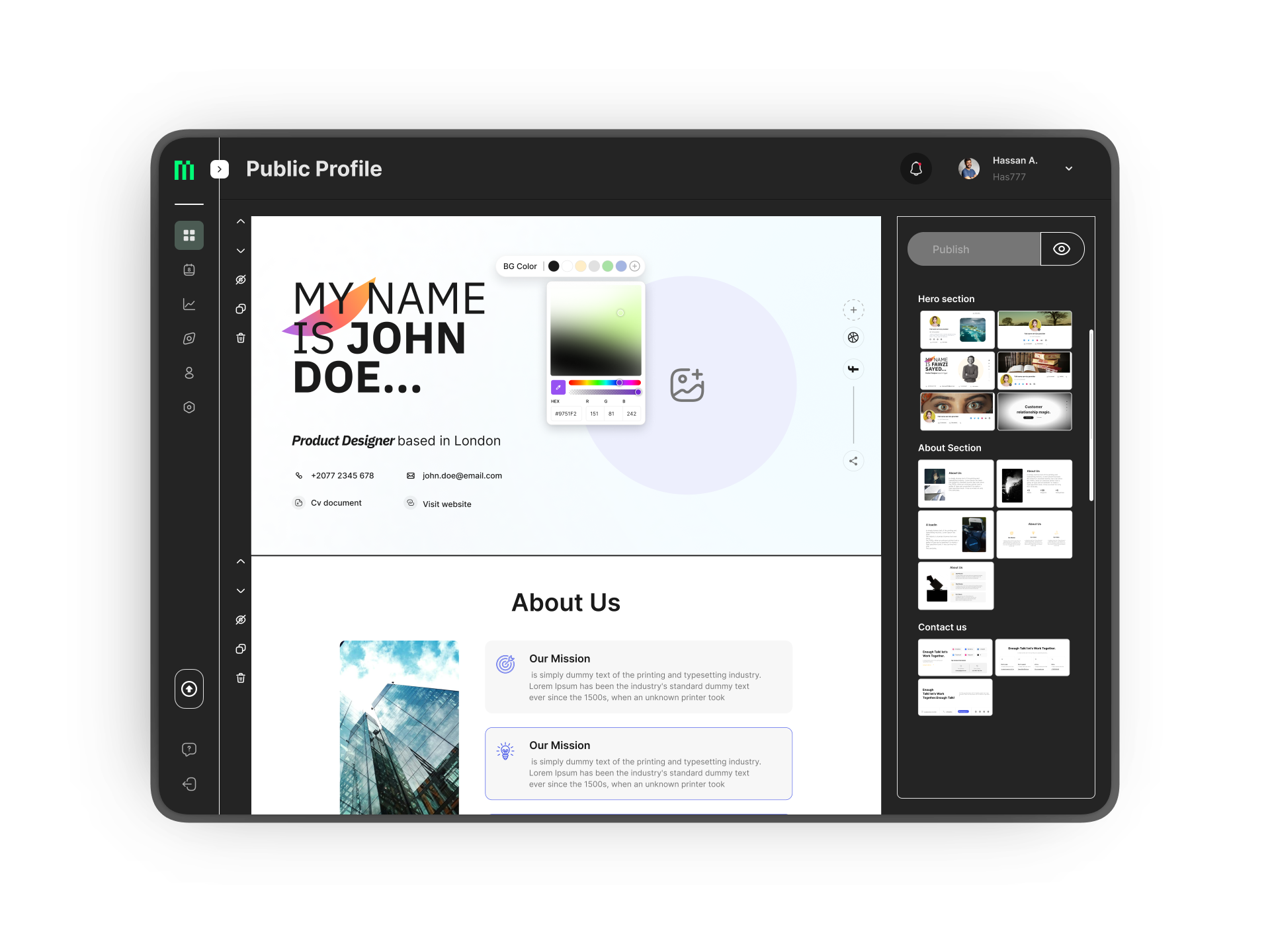
For most users, the public profile page was not just a booking link — it was their professional identity on the internet. We designed it to feel like theirs.

Fully modular, drag-and-drop section builder: hero, about, services, gallery, video, testimonials, available times, and company logos. Two distinct add-section paths — a guided step-by-step flow for new users, and a direct link-to-existing flow for power users.

why it matters

Cognitive load in profile builders spikes when users fear breaking something. The modular, reversible architecture — with deliberate delete/hide distinctions — gave users psychological safety to experiment without anxiety.

Public profile builder
Analytics dashboard
feature 04 / analytics dashboard

Data that answers real questions.

The analytics feature was designed to answer one question professionals actually care about: "Is my business growing?" — not to present raw data for its own sake.

Three insight layers: a summary view (key metrics at a glance), a trend view (booking and engagement over time), and a granular breakdown by service, client, or time period.

why it matters

Dashboards fail when they show designers' favorite charts instead of users' actual questions. Every metric displayed was mapped back to a specific question surfaced in stakeholder sessions.

feature 05 / settings & billing

Settings as a trust signal, not a utility.

Most designers treat settings as a utility. Users treat them as a trust signal. A well-organized settings architecture communicates: "This product is in control. Your data is safe."

Organized across: General, Integrations, Referrals & Promo, Languages & Location, FAQs, and Billing. The upgrade modal used a clear Free / Pro / Teams comparison with a deliberate “Best Value” indicator to increase Pro plan conversion.

why it matters

The upgrade modal is the highest-stakes screen in the product. Every element — copy, hierarchy, CTA placement — was designed to reduce anxiety at the moment of financial commitment without being manipulative.

Settings overview
Authentication flows
feature 06 / authentication

Zero friction at the front door.

The login screen is the first thing every user sees. We treated it as a brand moment, not a gate ? clean, confident, and fast to get through.

A single focused form with email and password, a persistent Forgot Password recovery path, and three SSO options — Google, Apple, and Outlook — covering the majority of the target audience's existing accounts. New users are one tap away via the inline sign-up link.

why it matters

Every extra step at login is a drop-off risk. By offering social login alongside credentials — without cluttering the screen — we reduced the decision load to a single choice and kept the entry experience consistent with the product's overall visual language.

The results.

Across 12 months, three platforms, and six major feature areas — the work delivered at both the product and the team level.

Note: The product was discontinued by executive decision before reaching live production. The work represented here reflects the full design lifecycle delivered during the project's active phase.

+80%
Stakeholder Satisfaction
Measured from the point of Design Lead transition — a direct signal of improved design quality, process rigor, and cross-functional trust.
Platforms Shipped
Web, Tablet, and Mobile — all from a single design system with platform-specific component variants and breakpoints.
6
Major Feature Areas
Auth, Home, Booking, Explore, Profile Builder, Analytics, Settings, and Billing — fully designed and delivered within the 12-month timeline.
20×
Screens Per Sprint
Up from 6 screens per sprint before the Design Lead transition — a 3? output increase driven by a mature design system and clearer process.
−50%
Design ↔ Eng Back-and-Forths
Establishing a shared workflow and handoff protocol between design and engineering cut revision cycles in half and increased delivery confidence.
1
Unified Design Language
Where there were fragmented, inconsistent patterns, a single token-based system emerged — giving three designers the ability to work in parallel without divergence.

What worked.
What I'd change.

The design system paid back every week.

The upfront cost felt like a slowdown in months one and two. By month four, it was the single biggest multiplier on team velocity and output quality. Designers spent less time on repetitive decisions and more time on meaningful interaction design.

Stakeholder alignment as a design accelerator.

By making stakeholder reviews structured, frequent, and tied to specific decision questions, we turned them into a velocity tool — not a bottleneck. The 80% satisfaction increase reflected better process trust, not just better pixels.

Ownership raised the floor.

Assigning designers clear ownership of specific feature areas created accountability and deep expertise. By the end of the project, each designer had become the subject matter expert on their area — dramatically improving handoff quality.

This project was design ops as much as design.

The visible output — screens, flows, components — was only half the work. The invisible output was a team with a shared language, validated process, and the confidence to push back on decisions that couldn't survive scrutiny. That is the work I'm most proud of.

I'd add lightweight user testing earlier.

Stakeholder alignment gave us speed, but there were moments where a 5-person usability session would have surfaced edge cases that only appeared post-launch. I'd advocate for guerrilla testing at key interaction decision points in future engagements.

I'd establish design metrics before the build.

We were deep into the project before establishing a clear measurement framework. Defining what "design success" meant quantitatively before starting would have sharpened prioritization and given the team a crisper north star throughout iterations.

.more work